エディター拡張にはおおまかに次の種類があります。
設定などをするウィンドウを作ります。
Editorディレクトリの下に、CustomWindowというクラスを作成し、次のようにします。
public class CustomWindow : EditorWindow {

	[MenuItem ("Window/CustomWindow")]
	public static void MenuShowWindow() {
		EditorWindow.GetWindow(typeof(CustomWindow));
	}

	void OnGUI() {
		EditorGUILayout.LabelField ("CustomWindow", "Hello");
	}
}
それでメニューバーの「Window→CustomWindow」を選択すると、
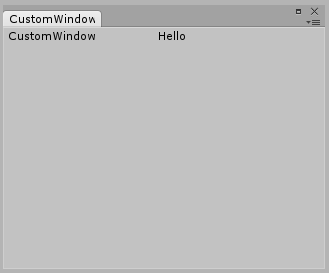
というウィンドウが表示されます。
このウィンドウの内容が、OnGUIで定義されているものになっています。
・PropertyDrawer
プロパティとしているクラスのインスペクタをカスタマイズする感じ。
public class PropertyDrawerSample : MonoBehaviour {
	public PropertyDrawerChild child;

	// Use this for initialization
	void Start () {

	}

	// Update is called once per frame
	void Update () {

	}
}
というクラスと
[System.Serializable]
public class PropertyDrawerChild : System.Object {
	public int no = 1;
	public string name = "childname";
}
というクラスを定義して、PropertyDrawerSampleをGameObjectにひっつけてインスペクタで見ると、
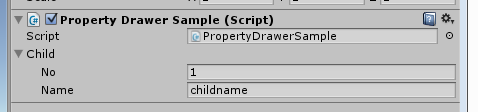
というふうになっています。
ここで、
[CustomPropertyDrawer(typeof(PropertyDrawerChild))]
public class PropertyDrawerChildDrawer : PropertyDrawer {

	public override void OnGUI(Rect position, SerializedProperty property, GUIContent label) {
		EditorGUI.BeginProperty(position, label, property);

		position = EditorGUI.PrefixLabel (position, GUIUtility.GetControlID (FocusType.Passive), label);

		var noRect = new Rect (position.x, position.y, 30, position.height);
		EditorGUI.PropertyField (noRect, property.FindPropertyRelative ("no"), GUIContent.none);

		var nameRect = new Rect (position.x+35, position.y, 50, position.height);
		EditorGUI.PropertyField (nameRect, property.FindPropertyRelative ("name"), GUIContent.none);

		EditorGUI.EndProperty ();
	}
}
というクラスをEditorに作成すると、

こうなります。
public class InspectorSample : MonoBehaviour {
	public int no;
	public string name;

	// Use this for initialization
	void Start () {

	}

	// Update is called once per frame
	void Update () {

	}
}
というクラスを作ってGameObjectに追加すると、インスペクタは

となります。
ここで、
[CustomEditor(typeof(InspectorSample))]
public class InspectorSampleEditor : Editor {
	public override void OnInspectorGUI() {
		InspectorSample obj = target as InspectorSample;

		obj.no = EditorGUILayout.IntField ("custom no", obj.no);
		obj.name = EditorGUILayout.TextField ("custom name", obj.name);

		if (GUI.changed) {
			EditorUtility.SetDirty (obj);
		}
	}
}
というクラスをEditor以下に定義すると、

こうなります。
まずは基本になっていると思われる、カスタムエディタから見ていきたいと思います。