iOS9で導入されたATS (App Transport Security)をUnityから生成したプロジェクトで無効にする方法です。
5.2.1以降
オプションで無効化を設定できるようになっています。
「File→Build Settings」でiOSのPlayer Settingsを表示すると、Other Settingsに
「 Allow donwloads over HTTP」という項目があるのでこれをチェック。
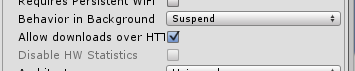
というかデフォルトで入ってました。
あとはiOS向けにXCodeのプロジェクトを出力すればOKです。
info.plistにNSAppTransportSecurityが追加されています。
5.2.0以前
こちらは追加するスクリプトを作り対応する必要があります。
といってもinfo.plistはただのXMLファイルなので、[PostProcessBuild]とかでinfo.plistを次のように修正すればOK。
string infoplist_path = System.IO.Path.GetFullPath(pathToBuiltProject) + "/info.plist";

XmlDocument doc = new XmlDocument();
doc.Load(infoplist_path);

XmlNode e = doc.SelectSingleNode("/plist/dict");

// NSAppTransportSecurityを追加
XmlElement key = doc.CreateElement("key");
key.InnerText = "NSAppTransportSecurity";
e.AppendChild(key);

// NSAllowArbitraryLoadsを追加
XmlElement dict = doc.CreateElement("dict");
XmlElement dict_key = doc.CreateElement("key");
dict_key.InnerText = "NSAllowArbitraryLoads";
dict.AppendChild(dict_key);
XmlElement dict_true = doc.CreateElement("true");
dict.AppendChild(dict_true);

e.AppendChild(dict);

// 上書き保存
doc.Save(infoplist_path);
ドメインを指定する、NSExceptionDomainsを設定する必要がでてきたら、5.2.1以降でもこちらを使う必要があるかもですね。
参考:
[iOS 9] iOS 9 で追加された App Transport Security の概要